

Disclosure: This article may contain affiliate links and if you purchase I may receive a small payment.
How to Automate a One Person Business
If you are trying to figure out how to automate a one-person business, you’ve probably run into two types of people.
On one side, you have the “hustle-harder” purists. They tell you that doing everything by hand is the only way to stay authentic. On the other side, tech gurus promise that a messy web of software tools will let you run a seven-figure empire from a beach hammock.
Both are lying to you.
Let’s clear the air. You have my full permission to automate. In fact, you have to.
If you are running a business alone while balancing a day job or a family, automation isn’t a lazy shortcut. It is your only path to survival. Your competitors aren’t sitting at their desks manually copy-pasting email addresses. They are using software to buy back their time.
If you insist on doing everything by hand out of some misplaced sense of “craftsmanship,” you aren’t being authentic. You are just being slow.
But there is a dangerous trap waiting for you.
When you start looking for leverage, it is incredibly easy to fall into the tech swamp. You sign up for five different subscriptions. You build elaborate, fragile integrations. Suddenly, you find yourself drowning. You spend your weekends debugging broken connections and staring at dashboards that don’t actually make you a dime.
You’ve traded your actual work for the illusion of productivity. You are just spinning your wheels.
This exhaustion is a silent killer. If you look closely at why online businesses fail in their first year, it’s rarely because the founder lacked a good product. It’s because they became high-volume, unpaid clerks for their own business. They got so bogged down in the administrative mess of moving data from one place to another that they had no energy left for making sales.
Automation should protect your energy, not drain it.
To make this work without losing your mind, you need to abandon the tool-first mindset. The secret to automating safely isn’t finding the perfect software. It is adopting a “Systems First” approach. Before we write a single automated rule, we have to map out how your business actually functions.
Only when you master the system can you safely let the software take over.
Systems Before Tools: You Cannot Automate Chaos
The moment we decide to build something, our brains crave a quick win. We want to feel like we are making progress without actually doing the scary work of finding clients or shipping products.
So, what do we do? We go on a software shopping spree.
We sign up for an email service, a scheduling tool, and an expensive project manager. We tell ourselves we are building the foundation for future growth.
But this is a trap. When you buy tools before you understand the actual flow of your work, you aren’t building a foundation. You’re building a playground.
Here is the unyielding rule of leverage: You cannot automate chaos.
If you try, you don’t actually automate your business. You just build a faster, more expensive way to break things. Before you write a single rule or pay for a single license, you must document your process as it exists right now. In all its manual, messy reality.
The Power of the Boring Google Doc
To get organized, you do not need a new subscription. You need a blank document or a simple spreadsheet.
If you want to keep your sanity, start by writing down the exact steps you take to complete a single task. Choose just one highly repetitive workflow to begin with. Do not try to organize your entire business in a weekend.
Let’s take client onboarding as an example. Write down the manual steps:
- The prospect sends an email asking to work with me.
- I reply with a link to my calendar.
- They book a time, and I write down their goal in my notebook.
- After the call, I type out an invoice and send it.
- Once they pay, I share a link to a Google Folder.
If you cannot write this sequence down in plain English, no piece of software on earth can save you. A documented process in a simple text file beats an unexamined process running through five connected apps every single time.
Finding the Bottleneck
Once your workflow is on paper, look for the friction. The bottleneck is rarely a massive strategic crisis. It is almost always administrative friction. Things like repetitive emails, form intake, or copy-pasting data from one tab to another.
“But I need the software to stay organized in the first place,” you might say.
No, you don’t. Organization is a discipline. Software is just an accelerant. If you cannot stay organized using a simple spreadsheet, adding a database tool will only give you a more complex place to be disorganized.
Do the work manually five times. Know exactly where the data goes, what questions need to be asked, and where the process snags. Once you have a repeatable system that bores you to tears, you have earned the right to automate it.
Three Automation Priorities for Solo Founders
Once you have documented a single workflow, the urge to automate your entire business overnight is going to be incredibly strong. You will want to build complex, branching trees of logic that connect every tool in your stack.
Resist that urge.
If you try to automate everything at once, you will spend all your time debugging broken integrations instead of running your business. Instead, focus your energy on three high-leverage areas where software acts as an immediate helper.
1. Where Leads Come In: Plugging the Leaks
The biggest threat to a one-person business isn’t a lack of ideas. It’s lost momentum. When a prospect reaches out, that information enters your universe through a dozen different doors: email, LinkedIn DMs, or contact forms.
If you have to manually check five platforms to figure out what you need to do today, you are bleeding mental energy.
The goal here is simple: Route every single incoming request to one central inbox or task manager.
- The Workflow: A prospect fills out a lead form on your website.
- The Automation: The form tool tags the lead, sends a quick notification to your task manager, and drafts a reply in your email client.
- The Result: Nothing slips through the cracks. You stop losing business to slow response times.
2. Writing the Same Emails: Replacing the Courier, Not the Writer
Many solo founders hesitate to automate communication because they fear looking cold or robotic. This is a misunderstanding.
Automation shouldn’t write your messages. It should deliver them. You are still the author. The system is just the mailman.
Think about the messages you write over and over again. The onboarding welcome email, the calendar booking confirmation, the invoice reminder. Writing these by hand every time doesn’t make you “authentic.” It just makes you slow.
- The Workflow: A client books a call on your digital calendar.
- The Automation: The scheduling tool sends a personalized confirmation email with a link to an intake form, creates a shared Google Drive folder, and sends a reminder email 24 hours before the call.
- The Result: The client gets a seamless experience, and you didn’t have to type a single character. You buy back hours of writing time.
3. Copy-Pasting Data: Eliminating the Clerical Loop
If you spend more than fifteen minutes a day copying information from one tab and pasting it into another, you are acting as an unpaid clerk. Moving data from Point A to Point B is not strategic work. It is purely mechanical.
Every time you manually transfer a client’s email address from an invoice to your newsletter list, you introduce the risk of making a mistake.
- The Workflow: A client pays an invoice.
- The Automation: The payment gateway updates the client’s status in your database, adds them to your email tool, and adds a row in your financial spreadsheet.
- The Result: Your records stay clean in real-time, completely hands-free. This saves solo founders five to ten hours a week during busy seasons.
What to Protect: Keep It Human
Nailing these three priorities will instantly free up massive amounts of mental space. But as you build these guardrails, remember the golden rule: Automate the repetitive stuff, but keep your human brain firmly in the loop for the sensitive moments.
Never attempt to automate:
- Client negotiations or pricing decisions: These require nuance and empathy.
- Apologies or crisis management: If something goes wrong, a canned, automated response is an absolute relationship-killer.
- Objection handling: True sales objections require active listening, not a generic, automated sales pitch.
By automating the mechanical plumbing of your business, you buy back the time and energy required to show up fully human for the moments that actually matter.
Free and Cheap Tools That Actually Work
If you spend ten minutes browsing social media, you’ll be convinced that running a solo business requires a five-hundred-dollar software stack. Tech influencers love to showcase highly complex configurations because they earn commissions on those recommendations.
Don’t buy into the hype.
As a solo founder, your goal is to keep overhead as close to zero as possible. You do not need a massive budget to build leverage. A handful of free-tier tools can cover almost all of your business needs.
The Solopreneur Toolkit
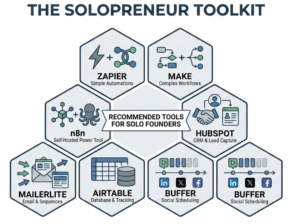
The “Practical Stack” Blueprint
For most solo operations, you don’t need all seven of these tools. You just need a balanced ecosystem. We recommend building what we call The Practical Stack:
- The Router (Make or Zapier): Think of this as the digital supervisor. It watches your business for events (like a form submission) and immediately tells your other tools what to do. Start on Zapier if you want simplicity; use Make if you need to build complex paths on a budget.
- The Database/CRM (HubSpot Free or Airtable): This is your central source of truth. HubSpot is built for tracking sales conversations. Airtable is essentially a spreadsheet on steroids, making it perfect for trackers. Pick the one that fits your workflow.
- The Email Engine (MailerLite): Once a lead is captured, MailerLite acts as your automatic communicator. It excels at delivering clean, multi-step welcome sequences without breaking your budget.
- The Queue (Buffer): Rather than logging into three different platforms every day to post content, you spend one hour on Sunday queuing up your week’s thoughts, and let Buffer deliver them on schedule.
Together, this entire stack costs exactly zero dollars per month to set up. Even as your business grows and you scale into the lowest paid tiers, your total software overhead will hover around one hundred bucks a month. That is an incredibly cheap price to pay for a virtual team that never sleeps.
When to Actually Pay
One of the quickest ways to ruin your profit margins is upgrading software prematurely. We advocate for a strict rule: No paid tools before you have traction.
You should only upgrade to a paid tier when you hit a hard wall. Specifically, wait for one of these three blocks:
- The Revenue Block: You are actively losing money because of a free-tier limit. If you hit HubSpot’s 1,000-contact ceiling and can’t add new paying clients to your system, upgrading is an investment in revenue.
- The Speed Block: The free tier’s delay is actively harming customer experience. If a hot sales lead fills out your form, waiting fifteen minutes for Zapier to route that lead to your inbox might mean losing them to a faster competitor.
- The Reliability Block: Your makeshift system is beginning to fracture under the weight of your actual volume. If your workflows are failing because you are constantly running out of Airtable’s 100 monthly automation runs, it is time to upgrade.
Do not pay for software because you hope to need a premium feature next month. Pay for software because your manual system is literally overflowing with clients.
A Streamlined Alternative
If managing multiple separate free tiers and linking them together feels too overwhelming, you can opt for an all-in-one platform instead.
For solo founders who want to avoid the integration puzzle entirely, we highly recommend Systeme.io. It seamlessly bundles landing pages, sales funnels, email marketing sequences, and basic automation rules into a single dashboard. Their free tier is remarkably generous, and it acts as an excellent, unified alternative to building a multi-tool stack from scratch.
Whichever route you choose, start simple, start free, and let your revenue dictate your upgrades.
The Safety Guardrail: Automate Repeatable, Review Weekly
Automation is a high-performance engine. But an engine is only useful if you have brakes.
The internet is flooded with tutorials showing you how to build complex, self-running business architectures. What these tutorials conveniently skip is the maintenance. They sell you on the dream of a “set-it-and-forget-it” business, leaving out the reality that software updates, API changes, and human behavior will eventually break your setups.
Most solopreneurs do not fail because their automations are too weak. They fail because they build a system, walk away, and wake up three months later to realize their welcome sequence has been sending broken links to hundreds of potential clients.
To run a leveraged one-person business safely, you cannot treat automation as a miracle. You must treat it as an employee that requires lightweight, structured supervision.
The LEVER Habits
To keep your operations from turning into a liability, use these five simple habits to maintain absolute control over your digital setup without sacrificing your time.
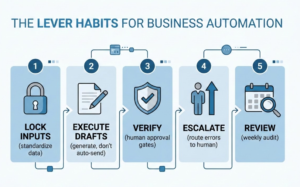
1. Lock Inputs
Before any automation can run successfully, you must standardize the data entering your system. If you allow messy, unpredictable data in, your automation will simply scale that mess.
Use strict input validation on all entry points. This means using dropdown menus, required fields, and clear formatting rules on your intake forms instead of open-ended text boxes.
For example, on your lead capture form, do not just ask, “How can I help you?” in a giant text field. Use a required dropdown menu with options like “Coaching” or “Consulting.” This clean data point allows your router to instantly send the lead to the correct folder.
2. Execute Drafts
Never let an automated workflow write and send a customized message directly to a client without your eyes on it first. Let automation handle the mechanical assembly of the communication, but keep yourself as the final sender.
When a high-ticket prospect fills out your inquiry form, your router can automatically fetch their details, pull a pre-written template, draft a reply inside your Gmail “Drafts” folder, and ping you. All you have to do is open the draft, add a personalized line reflecting their specific website, and hit “Send.” You save ninety percent of the typing time while maintaining the human relationship.
3. Verify
Any action that involves financial transactions, custom agreements, or sensitive account changes must have an explicit human approval gate. High-risk triggers must pause and wait for a manual click before completing.
If a client requests a refund through an automated portal, do not let your payment gateway auto-process it. Program the system to trigger an internal notification in your task manager with two buttons: Approve Refund or Escalate to Chat. This protects your cash flow from system glitches.
4. Escalate
An automated system must know its own limitations. When a workflow encounters an error or an emotional situation, it must immediately step aside and route the problem to you.
Define clear circuit breakers for your workflows. If an incoming client email contains highly charged keywords like “angry,” “upset,” “disappointed,” or “billing issue,” your system must automatically pause any scheduled follow-up sequences and flag the thread for an immediate manual response.
5. Review
The magic of these habits only works if you show up to inspect the machinery. You must schedule a recurring, non-negotiable operational checkup.
Block out thirty minutes on Friday afternoons for an “Automation Audit.” Open your Zapier or Make dashboard and look at the history. Check for failed runs, identify any bottlenecked tasks, and ensure your databases match. Spending thirty minutes checking the pipes prevents catastrophic, silent leaks from draining your business over time.
The Manual/Automated Split
To make this practical, you must draw a hard line between what belongs to the machines and what belongs to you. In a successful one-person business, the division of labor should look like this:
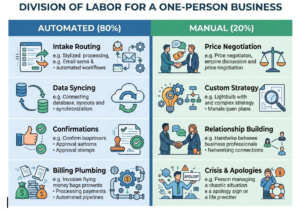
By keeping twenty to forty percent of your customer-facing work manual, you protect your brand’s integrity. Clients can tell when they are interacting with a human, and they are willing to pay a premium for it. Use your automated eighty percent to buy the mental margin required to show up exceptionally well for that human twenty percent.
Three Common Automation Traps
As you build, keep an eye out for these silent operational killers:
- Garbage In, Garbage Out (GIGO): If your spreadsheet columns are inconsistent, automation will only distribute your mistakes faster. Clean your databases manually before you write your first automated sync.
- Over-Automating Too Early: Do not automate a process until you have executed it manually at least twenty times. Doing it manually teaches you where the natural friction lies, what questions clients actually ask, and which steps are genuinely repetitive.
- Complex Branching Logic: Avoid building massive, multi-step automation maps that look like a spiderweb. If a workflow requires more than three “If/Then” branches to function, split it into two separate, simpler workflows. Complex workflows are incredibly difficult to debug.
The Price of Admission
The goal of automating a one-person business is to build freedom, not to build a complex software cage that you have to feed and clean every day.
By applying these simple habits, you ensure that your technology acts as a quiet, disciplined virtual assistant. It handles the boring, repetitive plumbing behind the scenes, leaving you entirely free to focus on the strategic creative work, relationship-building, and high-value decisions that actually move your revenue needle.
A thirty-minute review once a week is a tiny price to pay for a business that works while you sleep.
From Chaos to Leverage: When the Plumbing Just Works
If you have spent any time in the tech swamp, you know exactly what the before picture looks like.
You wake up to a barrage of notifications. Your calendar is double-booked because a scheduling link failed. You are spending your evening copy-pasting lead details from an intake form into a spreadsheet, all while trying to remember if you sent that proposal follow-up email. You are always reacting, always running behind, and completely out of mental space.
The tragedy is that you started this business to buy back your freedom. Instead, you built a high-friction, low-yield prison where you are both the warden and the only prisoner. You didn’t scale a business. You just scaled your own burnout.
This is the inevitable cost of skipping the systems layer. When you try to build a business with tools instead of processes, you don’t create leverage. You just speed up the chaos.
The Compounding Shift to “Systems First”
The transition to a highly leveraged, one-person business does not happen overnight in a dramatic breakthrough. It happens quietly, in small, compounding increments.
It begins the moment you close the software tabs, open a blank Google Doc, and document a single, messy workflow.
When you focus on systems first, the magic lies in the compounding math of automation:
- Resolving your intake bottleneck frees up two hours this week.
- Setting up automated email drafts saves you three hours of repetitive typing.
- Eliminating manual data entry saves you another five hours of administrative friction.
Suddenly, you have bought back ten hours a week of pure mental margin. You are no longer the bottleneck in your own business. Because the mechanical plumbing is running quietly in the background, you finally have the quiet mental space required to think, strategize, and create.
We call this simple formula The Leverage Multiplier:
$$\text{Documented System} \times \text{Simple Software} \times \text{Safety Habits} = \text{Exponential Freedom}$$
What True Leverage Looks Like
Once this multiplier is active in your business, the entire horizon shifts.
You no longer view growth as a threat to your personal life. When a new wave of clients comes in, your system handles the administrative intake, routes the data, and drafts the onboarding emails while you sleep. You don’t have to brace for impact every time your marketing succeeds. Your infrastructure is built to absorb the volume.
You show up to your high-value work with absolute presence. Because you aren’t exhausted by mechanical data-entry, you have the energy to deliver world-class strategy, build deep relationships with your clients, and make high-ticket decisions with a clear head.
The business finally runs with you, rather than because of you.
Your Permission to Build Simple
You do not need a team of employees to scale a highly profitable online business. You do not need a five-hundred-dollar software stack, and you certainly do not need to spend your weekends debugging massive, fragile webs of API integrations.
You just need the discipline to build simple.
The path forward is clear:
- Document one workflow in plain English on a blank document.
- Automate only the repetitive eighty percent using highly robust, free-tier tools.
- Protect your system with simple habits to keep human eyes on critical steps.
- Spend thirty minutes every Friday auditing the engine.
That is the entire blueprint. Stop playing the role of an unpaid clerk for your own business. Build the system, turn on the engine, keep your hand on the brake, and go build the freedom you set out to find.